Installation and configuration without mystery bullshit
Everything that makes the Windows VM, MT5 terminals, accounts, and sidecars boot without turning the setup into an archaeological dig.
Contents
Requirements
- Linux host with KVM enabled (
/dev/kvm) - Docker + Docker Compose
- ~20 GB disk (4 GB ISO + 11 GB VM + MT5 installs)
- 4 GB RAM for the Windows guest (
RAM_SIZEindocker-compose.yml), backed by 512M RAM plus 5G mem+swap on the container
The container ships with a 512M memory limit and 5G memswap limit, so the VM runs mostly on host swap. tiny11 + the debloat script idles at ~1.4 GB, MT5 + the Python API add a bit on top. For low-volume use (placing trades, polling positions, pulling small recent candle windows) this is fine: it’s not latency-sensitive enough for swap to matter. noVNC is there so you can watch the installation progress; after that, forget the UI exists and just hit the REST API.
When 512M is NOT enough
MT5 terminals cache every loaded chart in process RAM and never release it. The moment you start backfilling deep history (e.g. scraping all symbols × multiple timeframes × years of data) each terminal balloons to multi-GB. With a 512M container limit that all gets paged to host swap, Windows guest memory manager doesn’t know the pages are on disk, processes appear unresponsive, and Windows starts trimming/killing them silently. The cmd.exe wrappers stay open but blank, the Python API processes are dead, and you get a hung tunnel.
If you’re doing heavy historical data scraping, do at least one of:
- Bump the container memory limit to match real demand (4–8 GB for multi-terminal heavy scraping).
- Scrape one broker at a time (stop the others) so only one terminal accumulates cache.
- Restart the terminal between batches via
POST /terminal/restartto flush the chart cache. - Chunk time ranges instead of pulling 10 years of M1 in one shot.
Or just run MT5 on a dedicated box if you’re hammering it.
Real-world usage: 4 terminals on 2 vCPUs + 512M RAM (light load only)
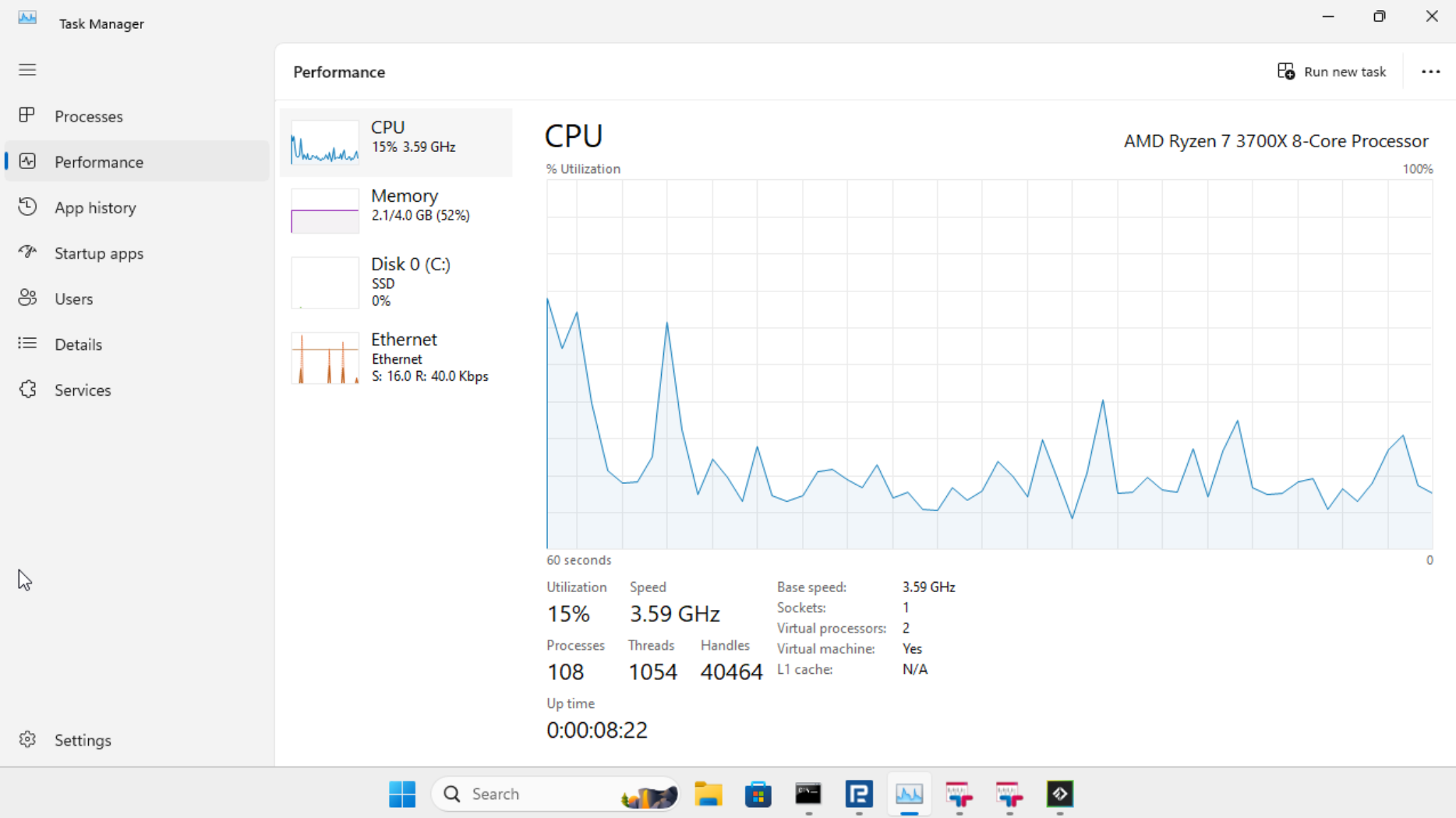
4 MT5 terminals (RoboForex, 2x TeleTrade, FTMO) running simultaneously on 2 vCPUs with only 512M real RAM. CPU spikes to 100% during startup, drops to ~15% idle. Total memory usage: 2.1 GB, comfortably on swap. This works as long as you’re not stress-loading it with deep history scrapes — at idle / light polling, you can pack 10+ terminals in here.
Configuration
config/config.yaml
This gitignored file controls the whole contraption. Copy config/config.yaml.example, edit it, and do not commit your fucking broker password.
# Bearer token for API auth. Empty = no auth.
api_token: "paste-the-output-of-openssl-rand-hex-32-here"

# VM auto-reboot every N minutes (flushes DWM/VirtIO-GPU state). 0 = disable.
reboot_interval: 30
reboot_max_postpone: 360
disable_terminal_mcp: false

# Default Strategy Tester timeout. POST /backtest can override per job.
backtest_timeout: "6h"

# Technical-analysis sidecar reached from inside the Windows VM.
wickworks:
  url: "http://20.20.20.1:8000/"
  timeout: "30s"

tailscale:
  auth_key: ""       # tskey-auth-... — empty disables the tailscale sidecar
  login_server: ""   # Headscale URL; empty = Tailscale cloud

# Signal copier, off by default (docs/signals.md). Its rules live in config/signals.yml.
signals:
  enabled: false

# Telegram account the signal copier reads channels with. session comes from make telegram-login.
telegram:
  api_id: ""
  api_hash: ""
  session: ""
  auth_key: ""

# Extra pip packages for the VM. The base packages pinned in requirements-api.txt are always installed.
requirements: []

# Broker credentials, organized by broker → account_name.
accounts:
  roboforex:
    main:
      login: 12345678
      server: "RoboForex-Pro"
      password: "your_password"
    demo:
      login: 87654321
      server: "RoboForex-Demo"
      password: "demo_password"

# Terminal instances — one MT5 process + one API process per entry.
terminals:
  - broker: roboforex
    account: main
    port: 6542
    utc_offset: "3h"
    symbol_suffix: ""
  - broker: roboforex
    account: demo
    port: 6543
    utc_offset: "3h"
    symbol_suffix: ""
  - broker: roboforex
    account: tester
    port: 6544
    utc_offset: "3h"
    mode: backtest    # don't auto-launch terminal64.exe; reserved for /backtest jobs
    symbol_suffix: ".r"  # optional explicit suffix for tester symbol remap
Per-field notes:
api_token— if set, every endpoint requiresAuthorization: Bearer <token>. Empty = open. Generate withopenssl rand -hex 32.reboot_interval— minutes between scheduled VM reboots.0disables.reboot_max_postpone: the longest a scheduled reboot waits, in minutes (default360), while any API on the VM is running a backtest or a request that changes something. Reads never hold it.0reboots on schedule without waiting. See operations.disable_terminal_mcp:trueturns off MetaTrader’s own MCP servers (terminal build 6090+, the transport behind its built-in AI assistant; not this API’s/mcp). Every such terminal tries to listen on127.0.0.1:22346, so with several terminals in a VM all but the first logMCP bind error on 127.0.0.1:22346 (10048)on every launch, and backtest terminals have aborted with exit code 10053 after the same subsystem failed to sign in to MQL5.community. Withtrue,Enable=0goes into[MCP.MetaTrader]and[MCP.MetaEditor]of each terminal’sConfig/assistant.inibefore every launch: at boot, on a restart the API makes, and before each backtest. MT5 rewrites the file on exit, which is why it happens every time. A terminal entry’s owndisable_terminal_mcp: falsekeeps that terminal’s servers on. Defaultfalseleaves the terminals as MetaQuotes ships them.desktop_heap_kb: opt-in size of each VM’s interactive desktop heap, in KB. Unset (or0) leaves Windows’ own value, 20480. A number from 20481 to 131072 raises it at boot (65536is what the runs below used);restoreputs back the value Windows had. Needed when a VM runs more than ~20 terminals: see operations.md.backtest_timeout— default Strategy Tester timeout forPOST /backtest. Accepts the same duration grammar asutc_offset:"6h","30m","3h30m","90m", or a bare number interpreted as hours. Per-request form fieldtimeoutoverrides it.wickworks.url: technical-analysis sidecar URL as seen from inside the Windows VM. The default reaches the sidecar sharing the MT5 container’s network namespace; override it only when changing that network topology. AWICKWORKS_URLenvironment variable in the API process wins over the file; nothing passes one into the VM, so setting it means editingscripts/api_runner.bat.wickworks.timeout: sidecar request timeout as a duration. Defaults to"30s"; aWICKWORKS_TIMEOUTenvironment variable in the API process wins, the same way asWICKWORKS_URL.tailscale.auth_key/tailscale.login_server— see Tailscale. Emptyauth_keyskips the sidecar.requirements— additional pip packages installed in the VM on every boot.max_request_body_bytesandmax_upload_body_bytes: request body caps applied to every route, refused with 413 from the declaredContent-Lengthbefore the body is parsed.max_request_body_bytes(default4194304, 4 MiB) covers everything that is not an upload;max_upload_body_bytes(default26214400, 25 MiB, the same as nginx’sclient_max_body_size) covers multipart and file API uploads. The upper-case environment variable of the same name wins, but only in the API process inside the VM, which gets none unless you add it toscripts/api_runner.bat. Zero, a negative or a non-integer falls back to the default with a warning. A route with a tighter cap of its own, such as/symbols/import, still reports that one.compile_api_token,compile_local_cache,compile_timeoutand the othercompile_*keys: the compile-only token and thePOST /compilesettings. See Compiling MQL5.chartctl: Chart Deployments, off unlesschartctl.enabled: true. See Chart Deployments.files: the file API, off unlessfiles.enabled: true. See File API.symbol_cache_max_ageandsymbol_import_max_body_bytes/symbol_import_max_symbols/symbol_import_max_symbol_length: the persisted symbol list and the caps onPOST /symbols/import. See Market data.accounts.<broker>.<account>—brokermust match the installer name (mt5setup-<broker>.exe) and thebrokerfield interminals[].accountmust match theaccountfield interminals[].terminals[].port— container-internal port for this terminal’s HTTP API. Only nginx and the mt5 container talk to it; not exposed to the host.terminals[].instance— optional terminal clone name. Use this when the samebroker/accountappears more than once. There is noqueuefield inconfig.yaml; callers select a specific clone by routing requests to/<broker>/<account>/<instance>/.... Missing/empty =default, and that default instance also keeps the legacy/<broker>/<account>/...alias.-
terminals[].utc_offset: broker server’s UTC offset, used to normalize all timestamps to real UTC on the wire (see Broker time vs real UTC). Optional, defaults to0. Accepts"3h","3h30m","-2h","90m", or a bare number (interpreted as hours). Common values: RoboForex/FTMO"3h", TeleTrade"2h".The offset is static and not DST-aware, so a value measured in summer is an hour off after the rollover.
scripts/measure-broker-offsets.py [broker/account ...]reads each terminal’s latest tick through the API and prints the offset to set; it needs the market open. It only works againstmode: liveterminals; amode: backtestterminal answers SDK routes with 503. terminals[].mode:live(default) orbacktest.livekeepsterminal64.exerunning so the MT5 SDK stays initialized for live trading endpoints.backtestprepares the same portable directory but does not launchterminal64.exe, leaving the data dir free for the Strategy Tester subprocess to grab. See Backtest. On abacktestterminal every route that needs the MT5 SDK (account, orders, positions, history, market data, terminal info) answers 503 instead of startingterminal64.exe. MT5 is single-instance per portable data dir, so a backtest cannot run against aliveterminal.terminals[].symbol_suffix— optional explicit symbol suffix for Strategy Tester remaps. If set, mt5-httpapi appends it when[Tester].Symboldoes not already end with that suffix. Examples:"p",".p","-mini". Use""for no suffix.terminals[].vm: optional VM name that this terminal runs on. Maps to a VM defined invms.yaml. Absent meansdefault(routes to themt5container). See Multi-VM Setup.-
terminals[].chartctl,terminals[].filesandterminals[].disable_terminal_mcp: per-terminal overrides.chartctl: falseorfiles: falsekeeps that terminal out of a feature that is on globally (see Chart Deployments and File API);disable_terminal_mcp: falseis described above. signalsandtelegram: the signal copier, which turns trade signals from Telegram channels and websocket feeds into orders on these terminals. Off unlesssignals.enabled: true; the rules are inconfig/signals.yml(templateconfig/signals.yml.example), andtelegram.sessionholds full access to a Telegram account. See Signal copier.
Each terminal installs to <broker>/base/ and gets copied to <broker>/<account>/<instance>/ (default when instance is unset) at startup so multiple accounts and clones of the same broker don’t step on each other.
vms.yaml (optional — multi-VM deployments)
When one Windows VM can no longer carry all your terminal bullshit, define the topology in vms.yaml. The file is optional: leave it out and the normal single-VM setup keeps working.
Each VM entry names its Compose service/container and defines its CPU, memory, disk, storage, log, noVNC, and optional Wickworks settings. Each terminal then selects a VM with terminals[].vm; terminals without that field route to the default mt5 container.
See the multi-VM setup guide for the authoritative example, complete field table, NUMA pinning, hot-tier bind mounts, generated files, and compose-generation workflow.
config/setup.bat
Optional. make up copies this file into the VM’s shared config directory if it exists, and start.bat runs it on every VM boot, after the prerequisites and pip packages are done and before any terminal launches. It is called, not started in the background, so it has finished when the terminals start. Its output goes to start.log in the shared logs directory, between a Running config\setup.bat... line and a config\setup.bat finished. line. It runs on every boot, so keep its commands safe to repeat. Without the file nothing runs.
A failing script does not stop the boot: when it ends with a non-zero errorlevel, start.bat logs WARN: config\setup.bat exited with errorlevel N, continuing boot. and goes on to launch the terminals. End the script with exit /b, not exit, which would close the console start.bat runs in and end the boot there. Edit the copy in config/ on the host and run make up again to copy it into the VM. start.bat runs with delayed expansion on, and the script inherits it, so a literal ! in its commands is eaten; write ^^! or turn it off with setlocal DisableDelayedExpansion at the top of the script.
config/hosts
Optional extra entries for the VM’s Windows hosts file. make up copies it into the shared config directory and install.bat appends it to C:\Windows\System32\drivers\etc\hosts once, under a # MT5-CUSTOM-HOSTS marker. Once that marker is in the hosts file, later edits to config/hosts are not appended again.
mt5installers/
Dump your broker MT5 installers here. Name them mt5setup-<broker>.exe and each one gets its own portable install automatically.
run.sh options
make up runs ./run.sh with no arguments. Run the script directly for these:
./run.sh --debloatdropsdebloat.flagin the shared directory, so the next VM boot runs the Windows debloat script again.SKIP_KVM_CHECK=1 ./run.shskips the check that/dev/kvmexists.