Assistant skills, agents and rules
Keep assistant instructions in /sdcard/Dikciz/assistant/. Open Dikciz > Skills, agents & rules to manage them, or edit them with a file manager and the shared file commands. No APK rebuild or remote token is needed for the built-in assistant. Chat reads the current library between model rounds; named agent instructions and restrictions are selected when an agent starts a turn.
assistant/
  AGENTS.md
  CLAUDE.md
  SOUL.md
  rules/
    phone.md
  skills/
    inspect-device/
      SKILL.md
      references/checks.md
      scripts/inspect.lua
  agents/
    device-reader.md
Global AGENTS.md, CLAUDE.md and SOUL.md are optional owner instructions. Markdown documents under rules/ are included with their paths and scope metadata. Use a skill for long procedures that should load only when needed. These files are executable configuration in the sense that they guide an assistant with phone access. Install instructions you trust. They cannot grant Android permissions, override read-only access or widen a parent's tool restrictions.
A reusable skill
The Agent Skills specification defines a SKILL.md with a name, description and Markdown instructions. Dikciz uses that shared structure, also used by Codex, Claude Code and Hermes. Place this example in skills/inspect-device/SKILL.md:
---
name: inspect-device
description: Inspect battery, memory and storage when the owner asks about device health.
---

Discover the installed device-state tool and read its schema. Read battery,
memory and storage through native APIs. Explain missing values as Android
restrictions. Do not change settings or stop applications.

Read references/checks.md if the owner asks for a detailed interpretation.
Only its metadata and content revision (sha256) enter the initial request. A changed revision tells the assistant to re-read previously loaded instructions. The assistant calls phone_skill with the exact skill name to load its instructions and directory. To read a supporting file, it uses phone_library with action:read and the exact relative path. Ask for $inspect-device to load that skill explicitly in the next turn. Skill names must match their directory, use lowercase letters, digits and single hyphens, and contain at most 64 characters. Descriptions are required and limited to 1024 characters.
Files under references/, scripts/ and assets/ stay available on demand. Reading a script never runs it. Execution uses the ordinary phone tools and their current permissions. Optional metadata such as license, compatibility and metadata remains descriptive. A skill's allowed-tools is not a grant or an executor boundary; use agent tool restrictions or a scoped remote token when that boundary is needed.
Named agents
An agent adds a specialized prompt to an isolated, persistent chat conversation. Create agents/device-reader.md:
---
name: device-reader
description: Inspect device health without changing the phone.
readOnly: true
tools: [dikciz_device_state, dikciz_device_info]
model: inherit
---

Report battery, memory and storage using native APIs. Keep the answer short.
Do not guess missing measurements. Explain Android restrictions when present.
Ask Dikciz to delegate a device-health check to device-reader. The compact phone_agent tool takes the exact installed name and a self-contained prompt. It runs the child in the parent's cancellable coroutine and returns the answer with a conversationId. Full transcripts remain available in the conversation list. A child can delegate up to two levels; attempts beyond that fail with agent_depth_exceeded. Stop and the parent's turn timeout also stop its children. Already completed phone effects remain completed.
The child inherits the current provider, model, token budgets, reasoning and access mode. Optional model, contextTokens, maxOutputTokens, maximumRounds, timeoutMilliseconds and reasoning fields select its settings. Use a model ID supported by that provider and set suitable budgets when changing models. model: inherit keeps the parent's model. The saved child retains its named agent selection. For an ordinary conversation, select one programmatically with chatControl, action configure, and settings.agent.
readOnly: true narrows access. false cannot undo an inherited restriction. Optional tools allows only exact Dikciz MCP tool names; disallowedTools denies exact names. Both affect tool discovery and execution. Parent restrictions continue to apply. Offline documentation discovery remains available. Unknown or unavailable phone tools never become executable merely because their name appears in a file. Read-only mode governs phone effects; local chat history and provider requests still occur.
Inherited tool restrictions are saved with child conversations, so reopening one does not widen its authority. Programmatic conversation settings toolAllowlist and toolDenylist accept arrays of exact MCP names, up to 512 entries each. An absent allowlist inherits available tools; an empty array allows no phone operations. A denylist removes names from that set. These settings narrow the local executor. Owner configuration changes remain subject to normal chat access and idle-state checks.
| Agent front matter | Accepted value | Behavior |
|---|---|---|
name | Required lowercase name, at most 64 characters | Exact delegation identity. Duplicate names fail. |
description | Required text, at most 1024 characters | Discoverable task summary. |
readOnly | true or false | true restricts tools; false retains inherited access. |
tools | List of exact Dikciz MCP names | Allows only these phone tools, intersected with inherited access. |
disallowedTools | List of exact Dikciz MCP names | Denies these tools in addition to inherited denials. |
model | Provider model ID or inherit | Selects the child's model at creation. |
contextTokens, maxOutputTokens | Integer | Child input/output budgets using the chat limits. |
maximumRounds, timeoutMilliseconds | Integer | Bounds child execution within the parent's remaining time. |
reasoning | Supported provider effort | Uses the same validation as ordinary chat settings. |
Rules and portable directories
Rules are Markdown documents. Optional front matter, including paths, is passed alongside their instructions. Path scope is a model instruction, not filesystem authorization. Use a token grant or read-only execution for enforced restrictions.
---
paths: [apps/**]
---

When changing a custom app, preserve its state and files unless the owner
explicitly requested their removal. Verify the saved app after editing it.
Inside the assistant root, Dikciz also recognizes skills in .agents/skills/, .claude/skills/ and .hermes/skills/; agents in .agents/agents/ and .claude/agents/; and rules in .agents/rules/ and .claude/rules/. Duplicate names within a kind fail rather than silently choosing one. These are portable instruction formats, not full emulation of another harness. Codex TOML agent configuration, Claude hooks, MCP server definitions, permission modes, background/isolation directives and external harness executables are not installed or executed by copying them here.
Front matter supports scalar fields, quoted strings, indented literal/folded text and simple inline or indented lists. Use plain Markdown for complex instructions. YAML anchors, tags and executable harness directives are rejected. Invalid instructions produce a visible turn error rather than silently disappearing. Supporting files must be UTF-8 for library reads; ordinary binary file APIs remain available separately.
Discovery, limits and backups
assistantLibrary is exposed as dikciz_assistant_library on MCP and shares the native executor across HTTP, WebSocket, Lua and JavaScript. action:list returns the root and bounded entry metadata. action:read requires a relative path. Entry id values are stable SHA-256 hashes of their instruction paths without the .disabled suffix; they do not change when the content or enabled state changes. Use action:loadSkill with the exact name of an enabled skill to read its text, relative directory and revision. phone_skill and phone_library share this executor and its grants. Remote clients need the installed library read grant; it does not imply file writes or chat control. Discover the current contract and grant IDs from the phone.
The library allows 512 files, 128 instruction entries, 12 directory levels, 64 KiB per text file, 512 KiB of instruction metadata/body data, and 128 KiB of injected owner instructions/catalog data. Exceeding a budget fails explicitly. The model's own input budget must also fit the selected instructions. Paths cannot escape the assistant root, include dot segments or follow symlinks. Put credentials in the provider connection settings, never in these files.
Encrypted backups include this entire assistant directory alongside custom-app source, state and files. Preview before a restore: replacing executable instructions can change future assistant behavior. Older archives preserve assistant files because their format did not include them.
Manage instructions on the phone
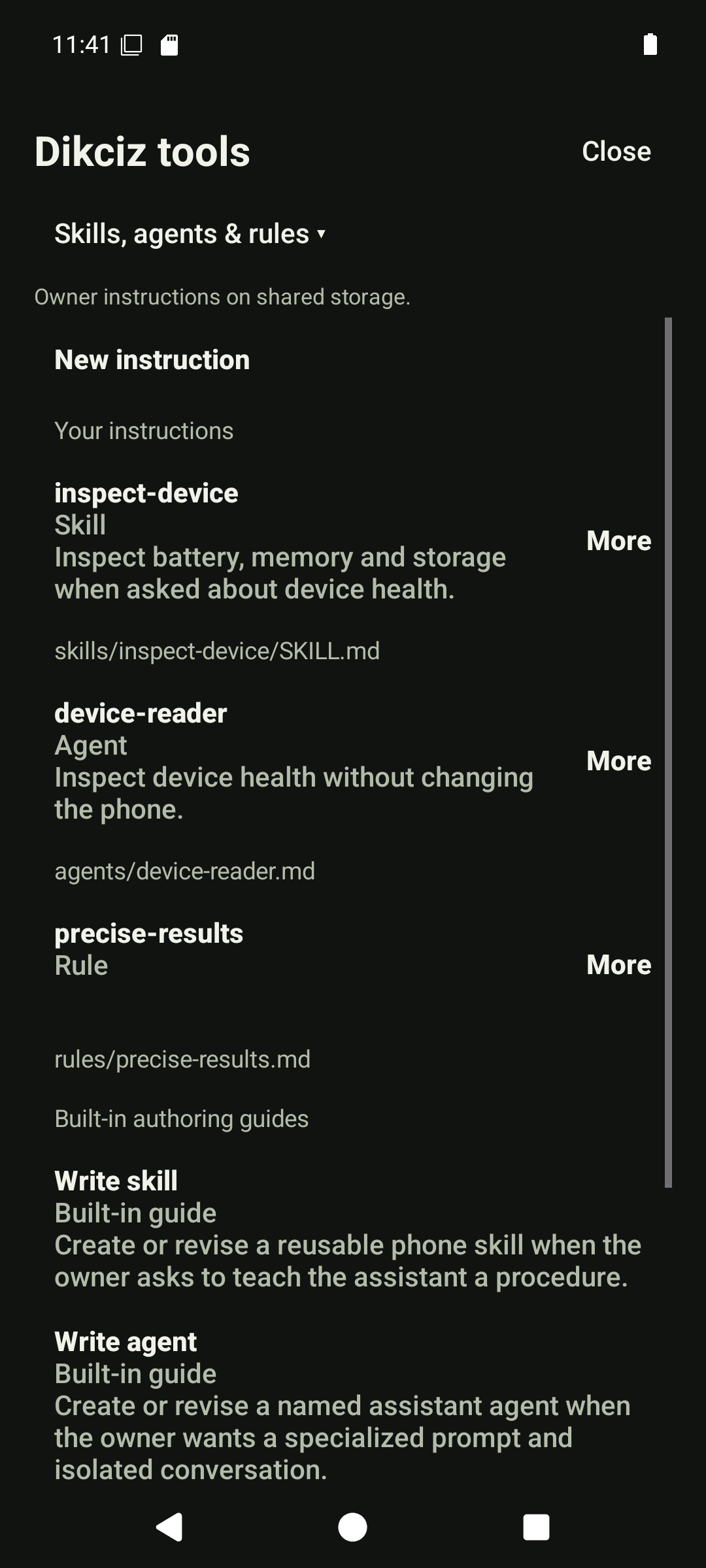
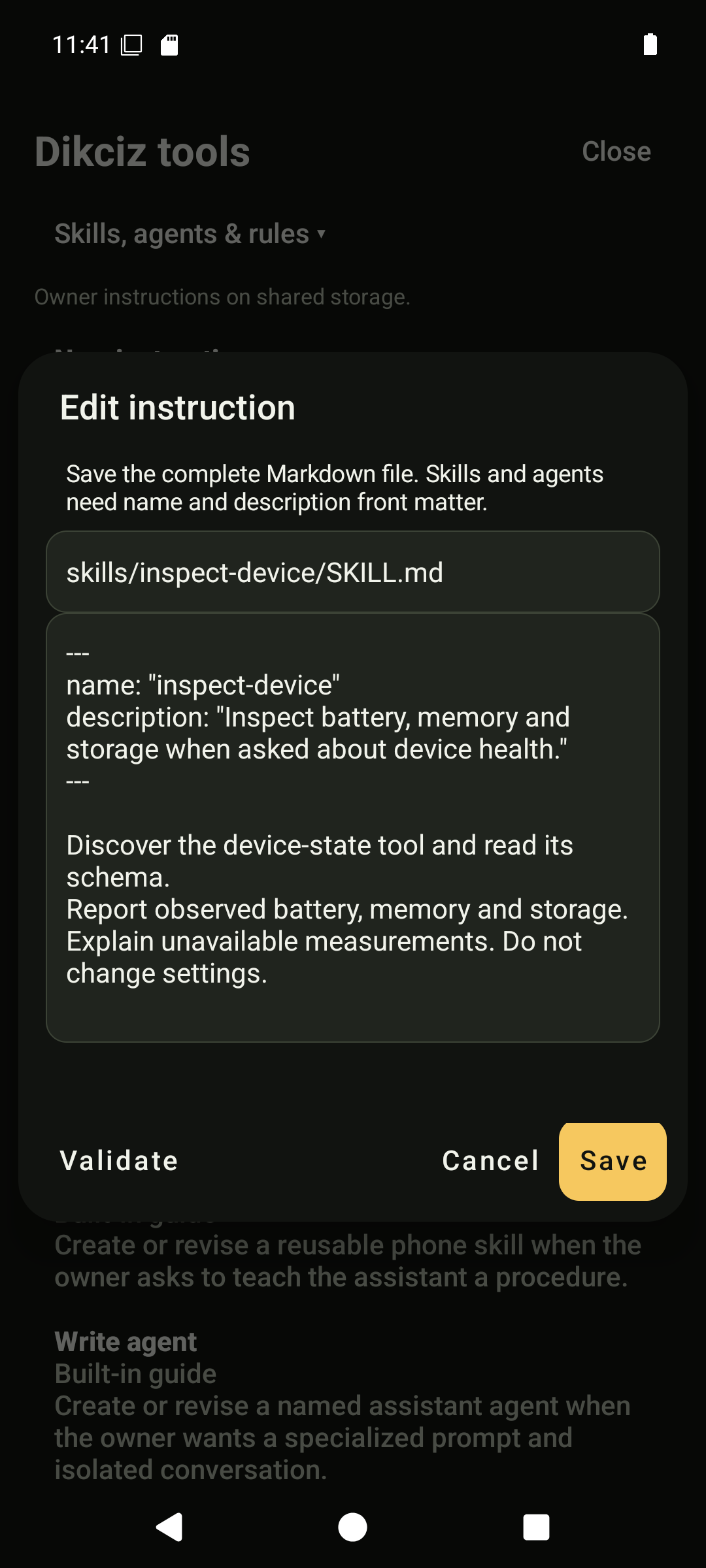
The manager lists skills, agents and rules with enabled, disabled, invalid and built-in states. Tap an owner item to edit the complete Markdown file. New instruction offers the three kinds. Validate checks the instruction format without saving; provider compatibility and agent token budgets are checked when an agent starts its turn. Save validates and atomically replaces the file. Errors keep the text in place. Rotation preserves an open draft. The item's More menu holds enable/disable and confirmed deletion. Deleting the instruction preserves its supporting files. Disabling adds .disabled to its filename, excluding it from subsequent model rounds. Re-enabling validates it and rejects duplicate identities.
Built-in guides explain how the assistant can write its own skills, rules and agents, plus how to debug automations. Their discovery metadata is always present. Their short bodies load on demand. Read them by name with phone_skill. The APK supplies the guides. Copy a guide to a differently named owner skill to customize it. The names below are reserved for bundled guides. If an older owner skill or agent uses one, rename it and update its front matter before using chat.
| Guide | Purpose |
|---|---|
dikciz-write-skill | Select a narrow trigger, write a procedure and optional references, validate and verify its installation. |
dikciz-write-agent | Write a named prompt, exact tool restrictions and read-only settings, then test isolated delegation. |
dikciz-write-rule | Place persistent owner preferences in the right scope without duplicating existing instructions. |
dikciz-debug-automation | Follow causal history, inspect retained events and simulate a current handler. |
dikciz-write-widget | Create and verify an HTML widget on a specific page. The Make widget task loads this guide automatically. |
dikciz-write-script | Validate a Lua or JavaScript handler against fixture events and verify its saved state. |
dikciz-write-app | Install or edit a custom app with a web UI and background handler. |
The bundled guides cannot grant access. The assistant still needs writable access to save instructions. Read-only mode hides the management tool and immediately rejects a forged call. Remote tokens use separate inspect/read/validate/manage operation grants from installed discovery.
Author through the shared API
assistantLibrary action inspect returns repairable validation errors, disabled files and built-in guides. Action list retains enabled owner entries and adds a separate builtins array. Action read returns exact text and a raw UTF-8 revision hash. This hash is the compare-and-save revision, distinct from an entry's metadata/body discovery sha256.
- Discover the current
assistantLibraryValidateandassistantLibraryManageschemas. - Read an existing path and retain its
revision. For a new file, use an empty revision. - Validate the relative
pathand completetextwithassistantLibraryValidate. - Save with the same path/text and
expectedRevision. A stale revision returnsassistant_revision_conflict; reread and reconcile changes. - Read the saved file and verify its discovery entry. Support files can be written with the ordinary file tools inside the skill directory.
Example HTTP/WebSocket create request for a persistent rule:
{
  "type": "assistantLibraryManage",
  "requestId": "example-author-rule",
  "action": "save",
  "path": "rules/precise-results.md",
  "expectedRevision": "",
  "text": "# Precise results\n\nReport observed results. Explain missing measurements.\n"
}
action:setEnabled requires enabled; action:delete removes one instruction file. Both require the current path and revision. Atomic replacement prevents partial writes by this tool; ordinary external file managers can still edit shared storage, so always reread on a conflict. Invalid drafts never replace the saved instruction. Inspection supplies raw revisions for corrupt files up to 1 MiB so they can be disabled or deleted; larger damaged files need the ordinary file tools first. Built-in paths cannot be written. See the debugger to test Lua or JavaScript before requesting live effects.