Build a todo app that reacts to GPS
Build one complete Dikciz app with a checklist, a JavaScript backend and saved state. Its Go to New York item checks itself when an accurate location fix enters an example destination circle. The backend keeps listening after you close its interface.
The working reference ships as Dikciz > Apps > Travel todo. Its five source files are also in this repository. It starts with location monitoring off. No API key, model, messages or calendar writes are involved.
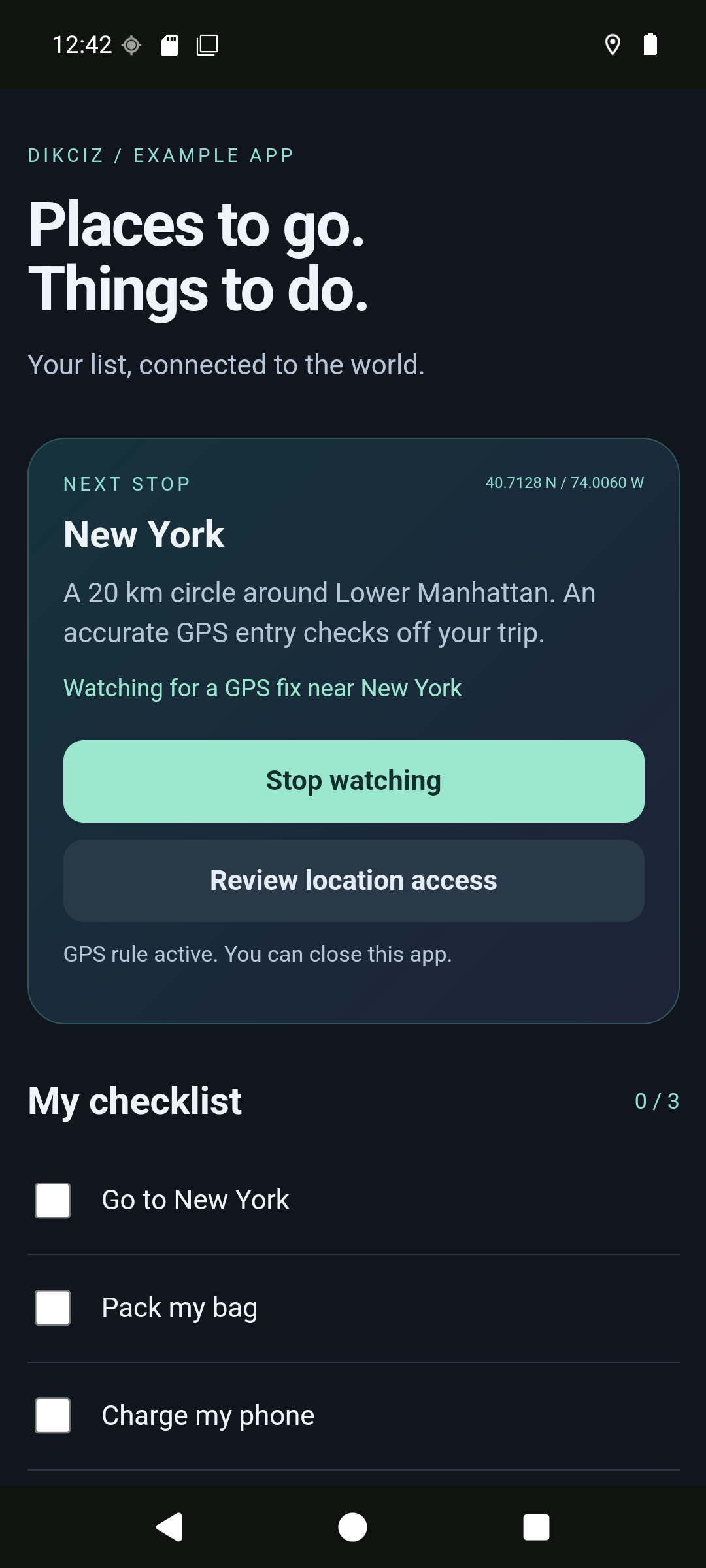
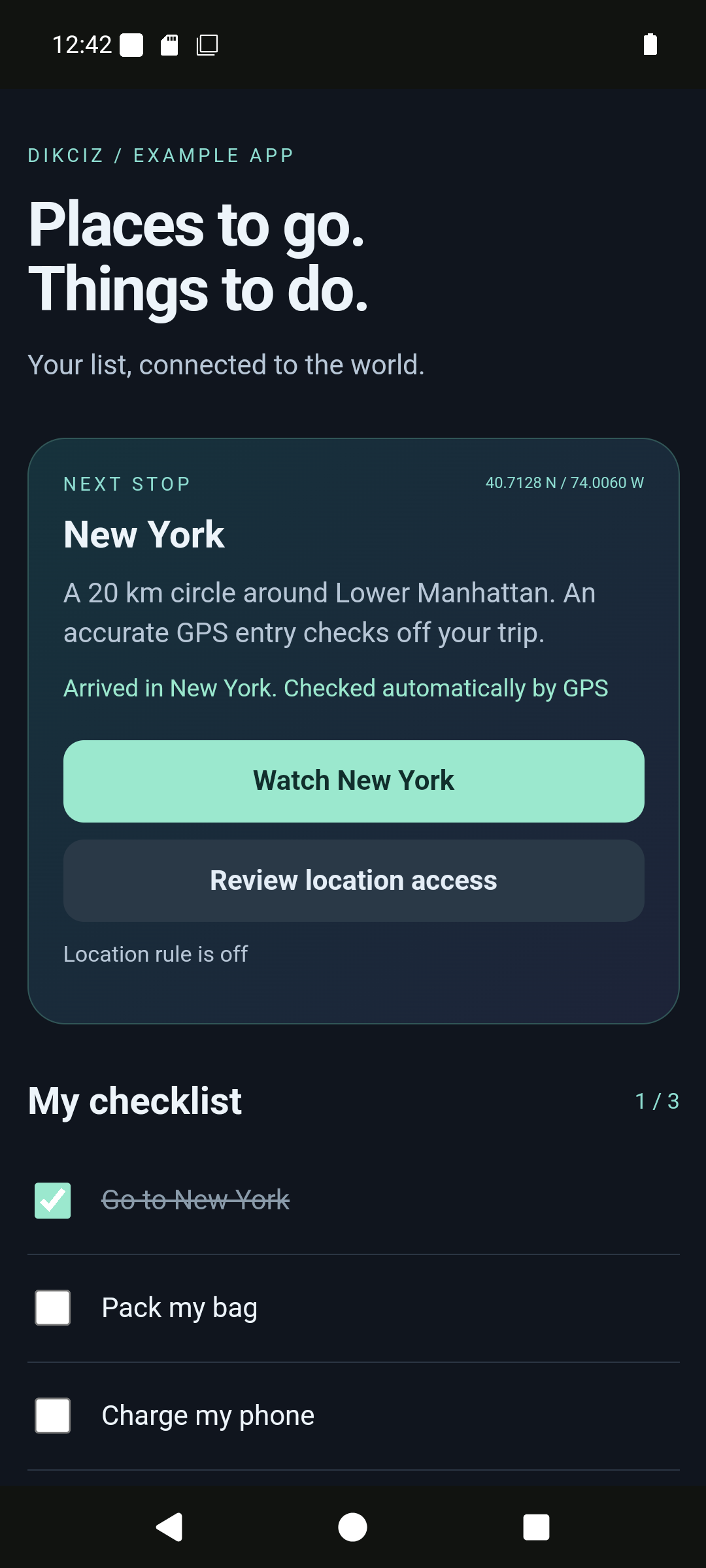
The captures come from the current development build on a private Android emulator. Its location was moved from London to New York through the emulator location fixture. The real Android location callback, native geofence, shared event bus, app backend and persisted state handled the change. This is not a physical trip or a synthetic geofence event.
flowchart LR
    GPS[Android location] --> Fence[Native geofence]
    Fence --> Event[geofence.enter]
    Event --> Backend[main.js]
    Button[UI action] --> Request[customAppEvent]
    Request --> Backend
    Backend --> State[state.json]
    State --> UI[ui.js redraw]
1. Open the reference
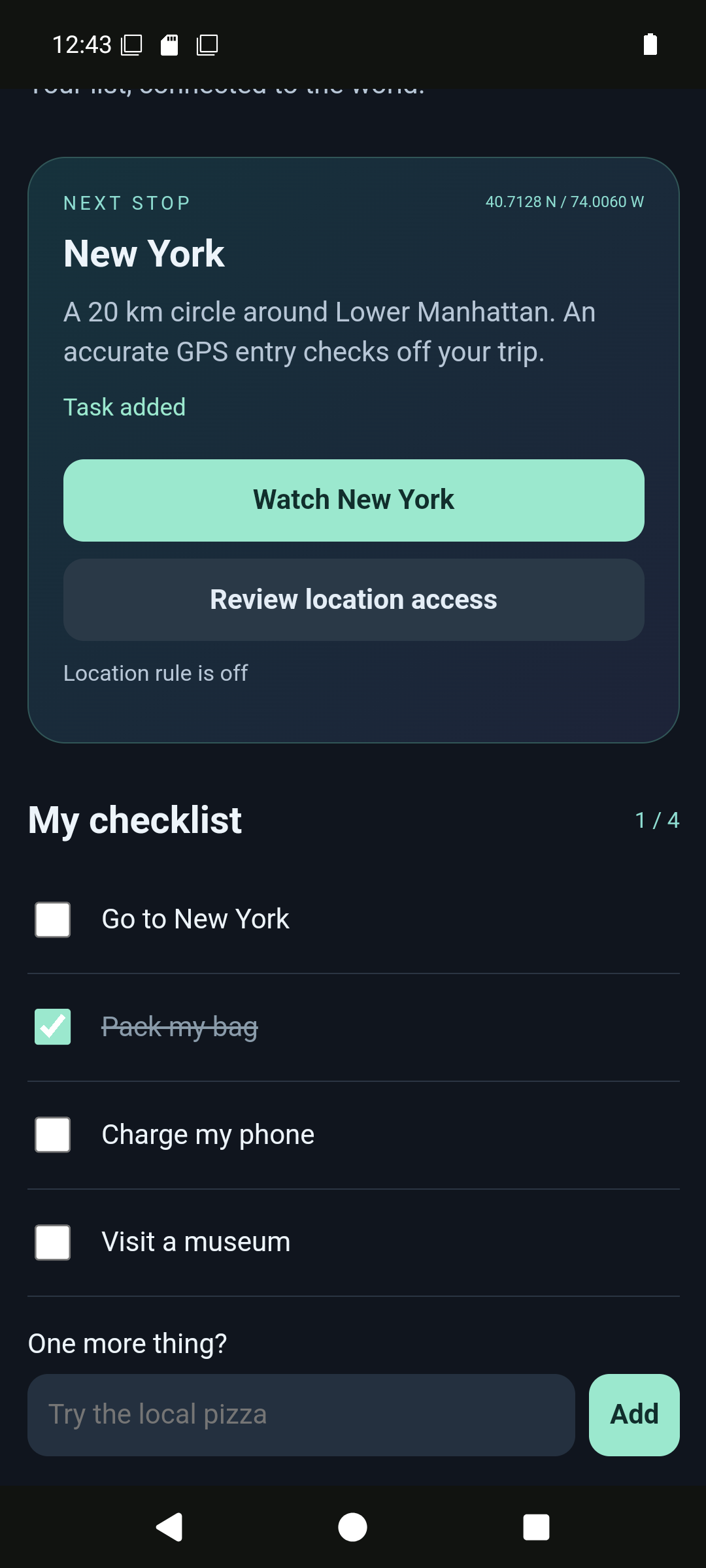
Open Dikciz > Apps > Travel todo. Check a task manually or scroll down to add your own. The initial list has Go to New York, Pack my bag and Charge my phone. You can use the list with location access denied.
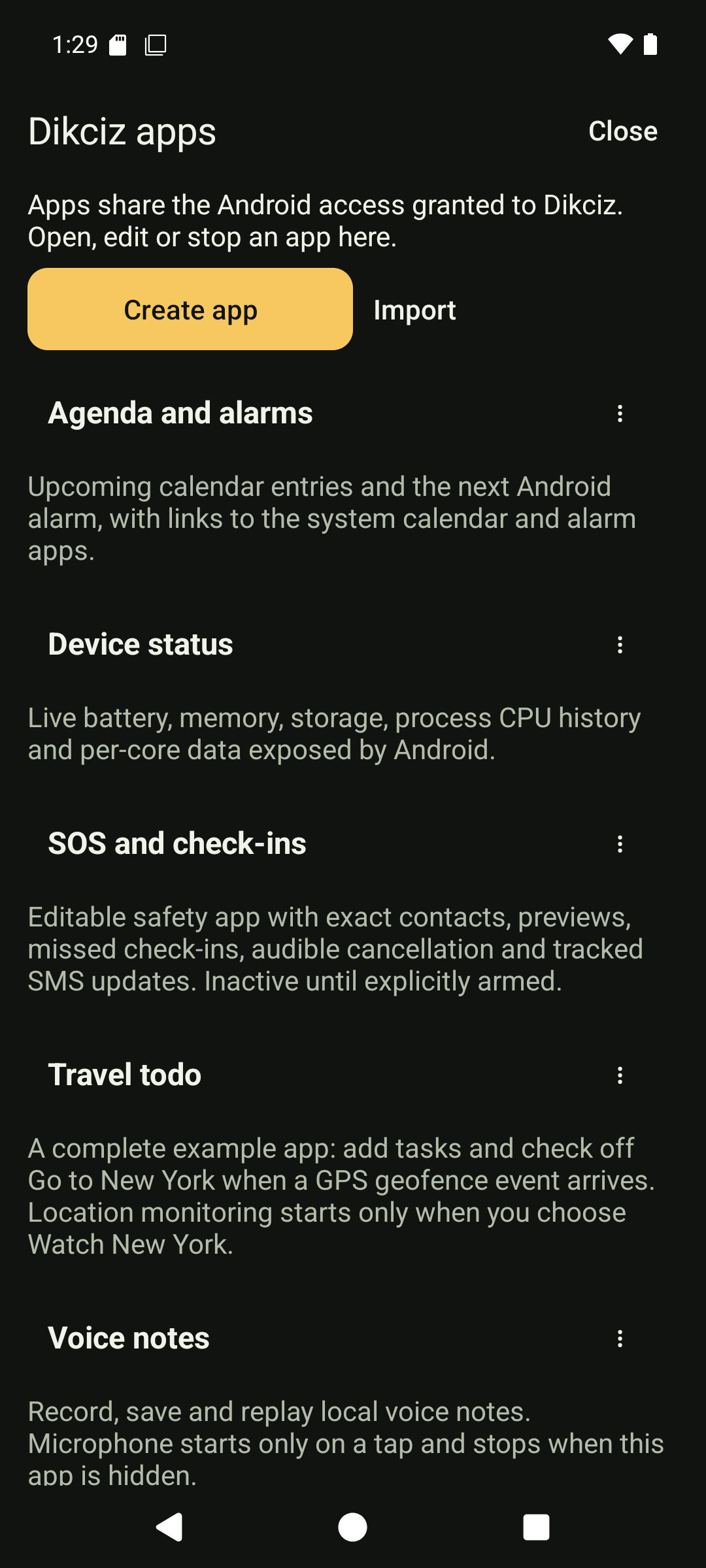
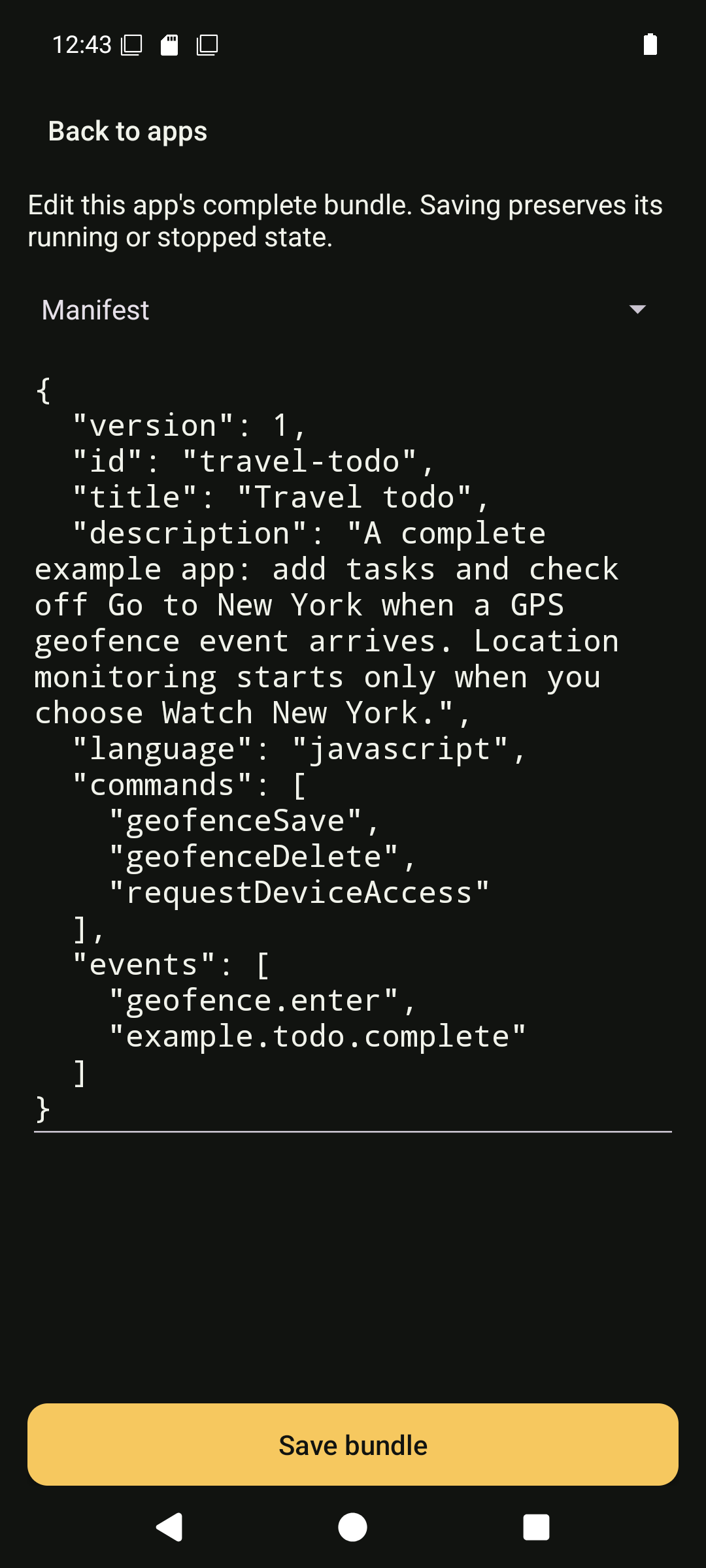
To inspect the source, return to Dikciz > Apps, open More actions beside Travel todo, then choose Edit bundle. The file selector exposes the manifest, HTML, CSS, UI JavaScript and backend source. Switching files preserves the other drafts; Save bundle writes them together. See the editor and recovery screens. Stop an active location watch before editing. Saving preserves whether the app is running or stopped. Open it directly, or choose Start app to resume a stopped backend.
2. Understand the five files
| Source | Job |
|---|---|
| app.json | Identity, command declarations and event subscriptions. |
| ui.html | Checklist, destination card, task input and explicit location controls. |
| ui.css | The complete document's layout and appearance. |
| ui.js | DOM listeners, bridge requests and redraws when state changes. |
| main.js | Headless task operations, geofence setup, event matching and cleanup. |
Dikciz installs editable copies at /sdcard/Dikciz/apps/travel-todo/. It writes state.json there and reserves files/ for app-owned data. App state is independent of home pages and widgets. Globals reset for each backend call, so keep durable values in state.
The manifest subscribes to two inputs:
{
  "version": 1,
  "id": "travel-todo",
  "title": "Travel todo",
  "description": "A checklist that reacts to GPS and custom events.",
  "language": "javascript",
  "commands": ["geofenceSave", "geofenceDelete", "requestDeviceAccess"],
  "events": ["geofence.enter", "example.todo.complete"]
}
The example uses geofenceSave, geofenceDelete and requestDeviceAccess. Its legacy commands metadata does not restrict access. All apps share Dikciz's Android grants; the host supplies app-local state/event bindings. Android must grant location to Dikciz before it can monitor a destination.
3. Send UI actions to the backend
The UI calls the shared bridge after dikciz-ready. For example:
const reply = await dikciz.command("customAppEvent", {
    event: "todo.add",
    payload: {title: "Try the local pizza"}
});
const state = reply.state;
The host fills in the calling app ID when omitted. An explicit app ID can address another app. onEvent(event) in main.js receives the event and a read-only context.state. It copies that state, changes the list and returns a patchState action. The host validates and saves it, then the visible UI receives dikciz-state and redraws. The UI uses DOM creation and textContent, so task titles remain text.
This is the shared result shape:
return {
    status: state.lastAction,
    result: {watching: state.watching},
    actions: [{type: "patchState", values: state}]
};
The example accepts up to 20 tasks with titles of 1 to 120 characters. Errors return a code and message; a rejected add leaves the typed title available to correct.
4. Set up the GPS rule
Choose Review location access, grant precise foreground location in Android and enable the device's location setting. Allow Dikciz notifications in Android so background monitoring has a visible notification. Return to the app and press Watch New York. Starting the rule is an explicit action, separate from opening or enabling the app.
The backend calls geofenceSave with these values:
{
  "id": "travel-todo-nyc",
  "title": "Travel todo: New York",
  "latitude": 40.7128,
  "longitude": -74.0060,
  "radiusMeters": 20000,
  "enabled": true
}
The 20 km circle around Lower Manhattan is an example destination, not the legal boundary of New York City. Change the coordinates and radius in NEW_YORK inside main.js for another destination. The fence ID derives from context.scriptId, so independent copies use independent fences.
Android supplies location callbacks to the native geofence host. Dikciz rejects stale or inaccurate fixes and uses crossing hysteresis. A fresh inside fix, including the first accepted fix when you are already inside, produces geofence.enter with payload.id, payload.title and payload.location.
The backend ignores unrelated fence IDs and inactive watches. On a match, it deletes its fence, sets the new-york task's done value to true and saves the list. Other tasks stay unchanged. Repeated events do not rearm the watch. Close the app, arrive, then reopen it to see the persisted result. Android can delay callbacks or stop background work; this is an automation example, not guaranteed arrival detection.
5. Trigger another task with a custom event
The same app listens for example.todo.complete. Its payload identifies one saved task, such as {"id":"pack"}. A broadcast reaches every enabled copy subscribed to that name. Use a different event name in each manifest and backend when copies should react independently. An ordinary HTML widget can publish it with:
await dikciz.emitEvent("example.todo.complete", {id: "pack"});
HTTP, WebSocket and MCP publish through automationDispatch, or MCP dikciz_automation_dispatch. Read the current configuration and substitute an actual HTML widget address for YOUR_HTML_WIDGET_ADDRESS:
{
  "sourceWidgetAddress": "YOUR_HTML_WIDGET_ADDRESS",
  "actions": [{
    "type": "emitEvent",
    "event": "example.todo.complete",
    "payload": {"id": "pack"}
  }]
}
A publish acknowledgement confirms publication. Read customAppRead for app travel-todo and check state.tasks for completion. This custom event exercises the same background subscription path. Owner-published events are automation inputs, not proof of a physical trip. Do not fabricate a geofence.enter event and call that a GPS test.
For an app-specific request without publishing, use customAppEvent with appId: "travel-todo", event: "todo.toggle" and payload: {"id":"pack"}. The accepted backend events are todo.open, todo.add, todo.toggle, todo.watch, todo.stop, geofence.enter, example.todo.complete and the host lifecycle events.
6. Copy, stop and extend it
Press Stop watching to delete this app's fence. Arrival stops it automatically. Disabling or removing the app invokes its app.stopped backend cleanup; that also deletes its own fence while leaving unrelated fences alone. Stop monitoring before editing or replacing its source. Native geofences are separate persisted records, so inspect Safety, journeys and devices > Places if you edited away the cleanup code.
Open More actions, Export reusable bundle to share the five source files. Exports exclude private state and recordings. To make an independent copy, install the source with a new app.json ID, then open it. The new ID gets separate state and an independent fence. Existing bundled copies preserve user edits during APK updates; a home reset does not restore edited app source. Current encrypted home/chat backups exclude custom apps.
To use Lua for background logic, change the manifest language to lua, provide main.lua with on_event(event) and keep the same interface files. For standalone background scripts without an app UI, read background JavaScript and the Lua/event tutorial. The custom-app guide owns host permissions, timers, alerts, archives and recovery.
Verify the example in development
From the repository root, use the pinned Android Lab image through Make:
make build
make dikciz-test-existing-apk DIKCIZ_TEST_SELECTOR=test_travel_todo
make dikciz-test-stop
The focused cases exercise all three transports, invalid tasks, custom-event delivery, real emulator GPS with the UI closed, saved state and geofence cleanup. Captures remain under .android-lab/shared/artifacts/travel-todo-guide/. The test uses the private emulator, not a connected physical phone.