Remote access tokens
Create separate bearer credentials for clients that need different phone access. HTTP, WebSocket and MCP enforce the same grants in the shared executor, including direct calls to hidden tools. Android permissions remain a separate requirement.
Set up a client
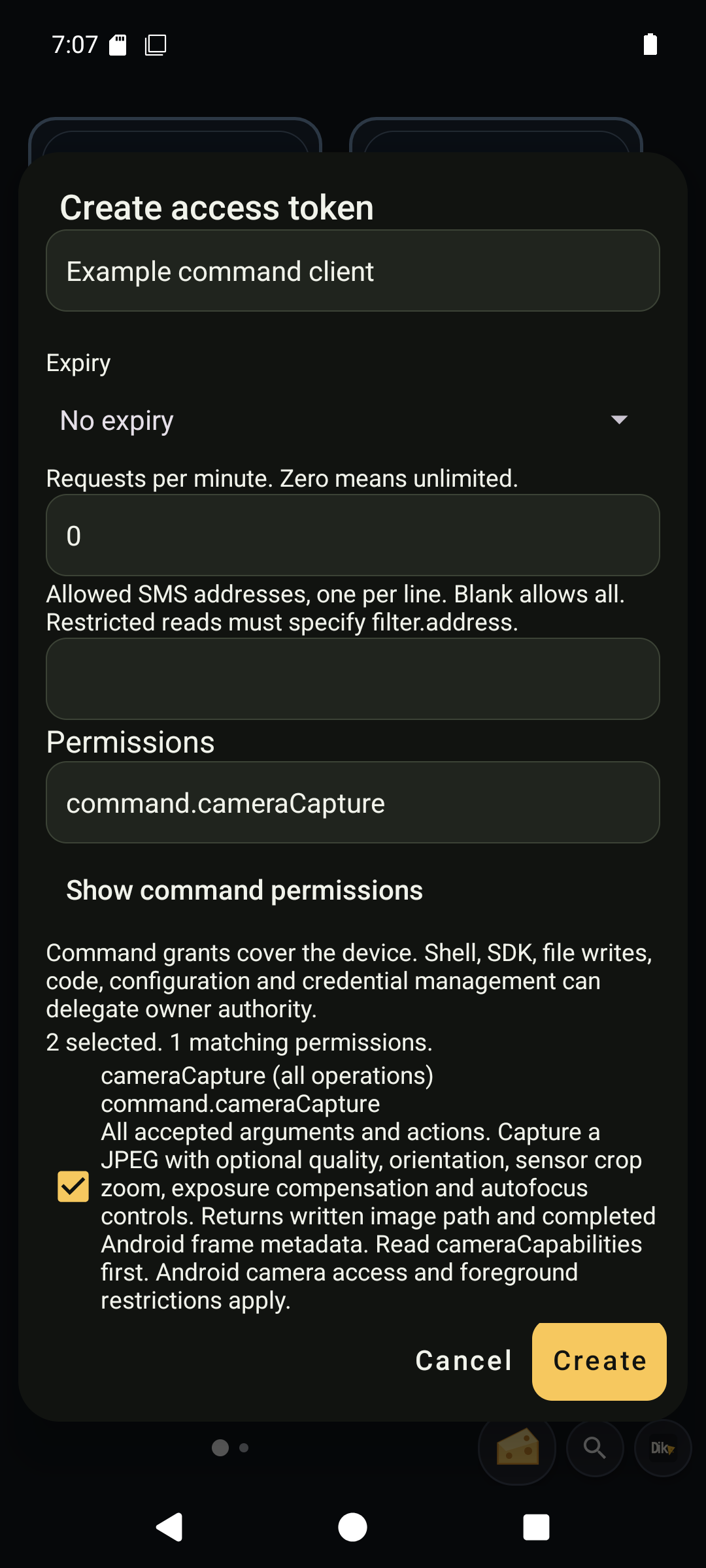
The illustrated token workflow shows creation, grants, Manage, editing and revocation. After creating a token, copy its one-time secret to the client before closing the dialog. The gallery omits secrets.
- Open Settings, Automation, Configure remote bearer authentication. Set an owner password and enable authentication.
- Open Manage access tokens, then Create token. Name the client and select its grants.
- Copy the generated token once into the client's secret storage. Closing the copy screen discards the recoverable value. Revoke and create another token if it is lost.
- Send
Authorization: Bearer <token>on every HTTP/MCP request and the WebSocket upgrade. The controller readsDIKCIZ_REMOTE_BEARER_TOKENfrom its environment. Never put credentials in URLs, prompts or command arguments. - Read
remoteAccessInfoordikciz_remote_access_info, then discover the permitted tools.
The existing owner password still grants full access. Full owner access tokens have the same authority, including creating or revoking other tokens. Keep them private. A scoped token can administer credentials only when explicitly given the corresponding command/action grant. Treat credential creation/update/rotation as owner-equivalent delegation.
Use Manage on a token to reveal edit, rotation, enable/disable and revoke actions. The list keeps token identity, grants and expiry visible.
Choose grants
Grants are additive. Select Full owner access alone, or combine specific grants. The native picker and remoteTokens action catalog provide the current list and descriptions. The complete permission reference lists every ID and command/action/resource combination. Search by ID, title or description; checked choices survive filtering. Common grants appear first; Show command permissions reveals explicit operation scopes.
| Need | Grants |
|---|---|
| Read SMS history only | sms.read |
| Read and send SMS | sms.read, sms.send |
| Resolve a recipient from contacts and send SMS | contacts.read, sms.send |
| Read sensor samples only | sensors.read |
| Capture the visible screen | screen.capture |
| Inspect visible UI text/components | ui.read |
| Inspect and act on other apps' components | ui.control |
| Discover and open installed apps | apps.launch |
| Read own SIM numbers | sim.read |
Other grants cover contact/calendar reads and edits, call history/control, app metadata, device readings/settings, location, notification reads/actions, media metadata, file reads, script logs, all automation events, custom search indexes, speech output, Bluetooth scans, Wi-Fi scans, USB inventory and NFC reads. Check the catalog for exact IDs.
Provider access is checked by resource and action. An SMS reader can query only sms, even though contentQuery serves several providers. Write grants do not imply provider read grants. Calendar writes cover events and reminders; calendar metadata and expanded occurrences are read-only resources. sms.send includes send-status and SIM selection; it hides own phone numbers unless sim.read is also granted.
Some grants confer broad authority. ui.control can send messages or change settings through another app's UI. It blocks component actions inside Dikciz itself. notifications.control can send inline replies. files.read can read every Android-accessible file outside protected credentials. events.read receives the shared event feed, including other operations' payloads. Combine grants only for trusted clients.
Every exposed command also has an explicit command.<type> grant. Finite schema selectors add narrower IDs such as command.fileManage.action.stat, command.contentQuery.resource.sms and command.systemSetting.action.get.setting.brightness. Select exact IDs from the catalog rather than constructing them from memory. Grants combine additively; broad grants are not narrowed by narrower ones. Shell, SDK, code installation/invocation, intents, configuration and credential-management scopes can confer broad owner-equivalent authority. They are operation permissions, not execution sandboxes. Android still governs access and root. Jobs additionally enforce the nested command grants and caller ownership.
Administration API
All three network transports use the same procedure:
| Action | Required fields | Result |
|---|---|---|
catalog | action | Available permission IDs, titles and descriptions. |
list | action | Token metadata, never secrets or digests. |
create | action, name, permissions | Metadata plus token, returned once. |
update | action, id; at least one of name, permissions, enabled, expiresAt, requestsPerMinute, smsAddresses | Updated metadata. |
| revoke | action, id | Remaining metadata. Revocation is permanent. |
| rotate | action, id | Replacement token, returned once. The old secret stops working immediately; identity and grants remain. |
HTTP/WebSocket use command remoteTokens; MCP uses dikciz_remote_tokens. Example arguments, sent with an existing owner credential:
{"action":"create","name":"Sensor dashboard","permissions":["sensors.read"]}
Create and update also accept expiresAt (epoch milliseconds, zero for no expiry), requestsPerMinute (0 to 10,000, zero for unlimited), and smsAddresses (up to 64 unique exact addresses; empty allows all). Omitted update fields retain their values. Expired credentials fail authentication, including on established connections. Rotation preserves expiry and limits.
When smsAddresses is nonempty, an SMS history query must include filter.address with one exact permitted address. A send must use an exact permitted recipient. An unrestricted query is denied before Android provider access. This filter does not grant SMS reads or sends by itself.
The request limit counts accepted ordinary commands across all network entrypoints in a rolling minute. The remote_rate_limited error rejects excess commands before execution. Usage survives process restart. Token metadata includes lastUsedAt (null until an accepted command), expired, and configured limits. Discovery and handshake requests do not consume this command allowance.
Call remoteAccessInfo to inspect your own effective grants, expiry, request limit and exact SMS address restrictions before choosing query arguments. The native manager offers expiry choices, limits, SMS address restrictions and rotation. Copy a rotated secret before closing the copy screen.
Names contain 1 to 80 printable characters. At most 32 tokens may exist, including disabled tokens. Grants must be known, nonempty and unique. Unknown fields are rejected. Each token has a public ID, display name, grant list, enabled flag and creation timestamp in epoch milliseconds.
Updates and revocations take effect on the next authorization check without restarting listeners. In-flight side effects cannot be rolled back. Connection-bound streams stop when their authorization monitor fails. Accepted process-owned capture sessions or jobs need their dedicated stop command or owner notification; revocation does not undo previously accepted work. Reconnect WebSocket after editing its token and initialize a fresh MCP session when changing credentials. MCP sessions are bound to the authenticated identity; another valid token cannot reuse or delete them.
Revoke every token before disabling or clearing authentication. Disabled tokens still count because opening the listeners would bypass their restrictions. Replacing the owner password preserves tokens. After the last token is revoked, the existing enable/disable and phone password-clear flows work normally.
Discovery and errors
tools/list, controlStatus and installed-schema search in collection tools filter commands by grants. Mixed provider/action schemas narrow their enums. Tool search filters before ranking and pagination. Custom collection names and documents require search.read; index changes require search.write. Packaged documentation remains readable as reference.
Restricted WebSocket hello replies contain an empty, marked snapshot unless UI reads are granted. Clients without events.read receive their own command replies, but no shared broadcasts. Owner clients retain full snapshots and event feeds.
A valid credential calling an unauthorized operation gets remote_permission_denied. A missing, malformed, disabled or revoked credential gets HTTP 401 at the network boundary, or remote_auth_required on an established WebSocket. An out-of-scope tool document is absent and returns search_not_found. A denied command does not trigger Android permission prompts or execute the operation.
Storage and local bindings
The protected /sdcard/Dikciz/control/remote-auth.json record retains the owner's bcrypt cost-12 verifier. Generated tokens contain 256 random secret bits; only their SHA-256 digests and metadata are stored. File APIs reject the credential record, its atomic aliases and lock file. Full shell/SDK authority is an independent privilege and can reach files available to its Android identity.
Existing password-only records remain compatible. Token records use an extended version, saved atomically under a shared record lock. Invalid records fail closed. Tokens survive activity recreation and app updates.
The built-in chat, HTML bridge and enabled Lua scripts keep their direct in-process owner bindings. They do not store a bearer token or make a loopback MCP connection. Chat's read-only mode still hides write tools and independently blocks writes in the executor. Remote token grants do not weaken that check.
Search the complete grant catalog
Search matches permission IDs, names and definitions. Checked choices remain selected when the query changes. Use Show command permissions to browse operation scopes, or search an exact command directly. The permission reference defines every available choice.