Starter home
Fresh installations and Reset Dikciz home use four pages: Home, Tools, Device and Goblin. Customized homes survive APK updates; a still-pristine starter may refresh to the bundled layout. Reset replaces pages, restores matching bundled utility scripts and the 8-column, 6-row grid, and preserves unrelated saved scripts and policies.
Every HTML widget owns its complete HTML, CSS, JavaScript, state and files. Long press its content or handle to edit, resize, move, change appearance or delete it. Removing one widget preserves its neighbors and removes its own files beneath /sdcard/Dikciz/pages/<page-id>/widgets/<widget-id>/. Library templates create independent copies.
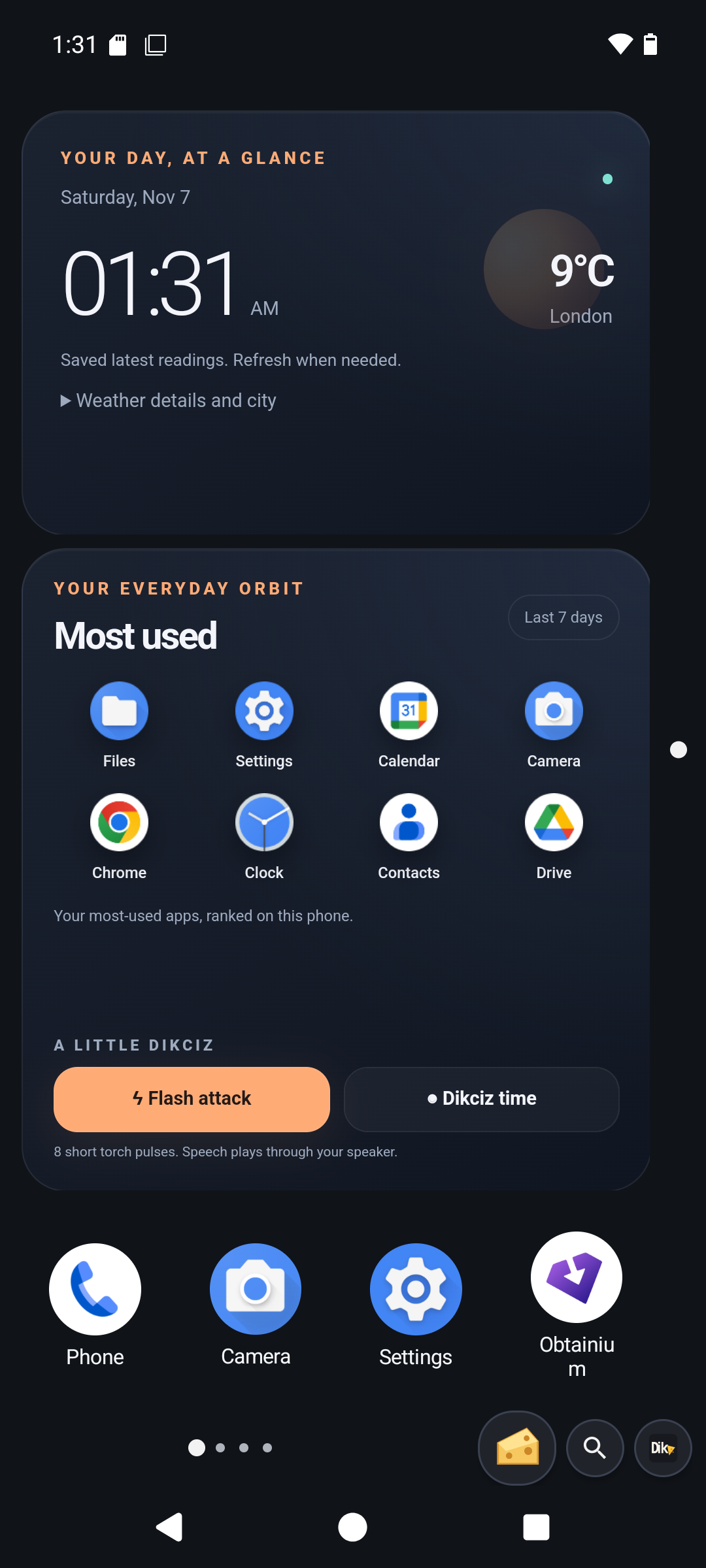
Home
Time and weather occupies two rows. It shows local time, date, city and temperature. Expand Weather details and city for feels-like temperature, wind, rain probability, low/high, European AQI and city controls. It tries already-permitted phone location when no city is saved. Missing access stays inline until you tap Use my location. Grant access, then tap again. A manual city takes precedence. Device locations are checked again after five minutes while visible.
City search sends the name to Open-Meteo; weather and air-quality requests send coordinates. The services load independently, retain dated successful readings on failure and refresh missing or fifteen-minute-old readings when opened. Requests time out after fifteen seconds and accept at most 64 KiB each. There is no hidden-page polling. Calendar, recordings and device metrics are not sent.
Attribution: Open-Meteo weather, geocoding, and CAMS ENSEMBLE air quality through Open-Meteo. Public endpoints are for personal, non-commercial use under the provider terms.
Most used apps occupies three rows and shows up to eight installed apps with Android icons. Optional Android Usage access lets it rank foreground time over seven days. Without access or recent history, it shows Your apps. Tap Use app history, allow access in Android and return. Usage ranking refreshes once a minute while visible and immediately on return to the widget. The document subscribes to Android package changes and removes an uninstalled app immediately, including during an in-flight icon request. Updated complete template copies establish their own packageChanged subscription without replacing other subscriptions. App icons use the same checked launch action as other entrypoints.
The final row contains native Phone, Camera and Android Settings shortcuts, then Obtainium, F-Droid or Play Store in that preference order. Dikciz resolves installed launchable activities and their real icons. Missing handlers leave their slot empty. These are ordinary movable and editable shortcuts on Home. Hold a native app or group still for one second, then drag to move it. Releasing after the hold opens its edit controls. Moving before that deadline cancels the hold and cannot group icons.
Flash attack requests eight brief torch pulses. Tap again to stop. Each on request has a native 250-millisecond off timer independent of JavaScript; leaving the page also requests off. Camera access is requested only after a tap. Missing flash hardware produces an explicit error. Dikciz time speaks its demonstration line through Android text-to-speech at the current speaker volume. Neither action starts automatically. Speech is not a cellular call.
Tools
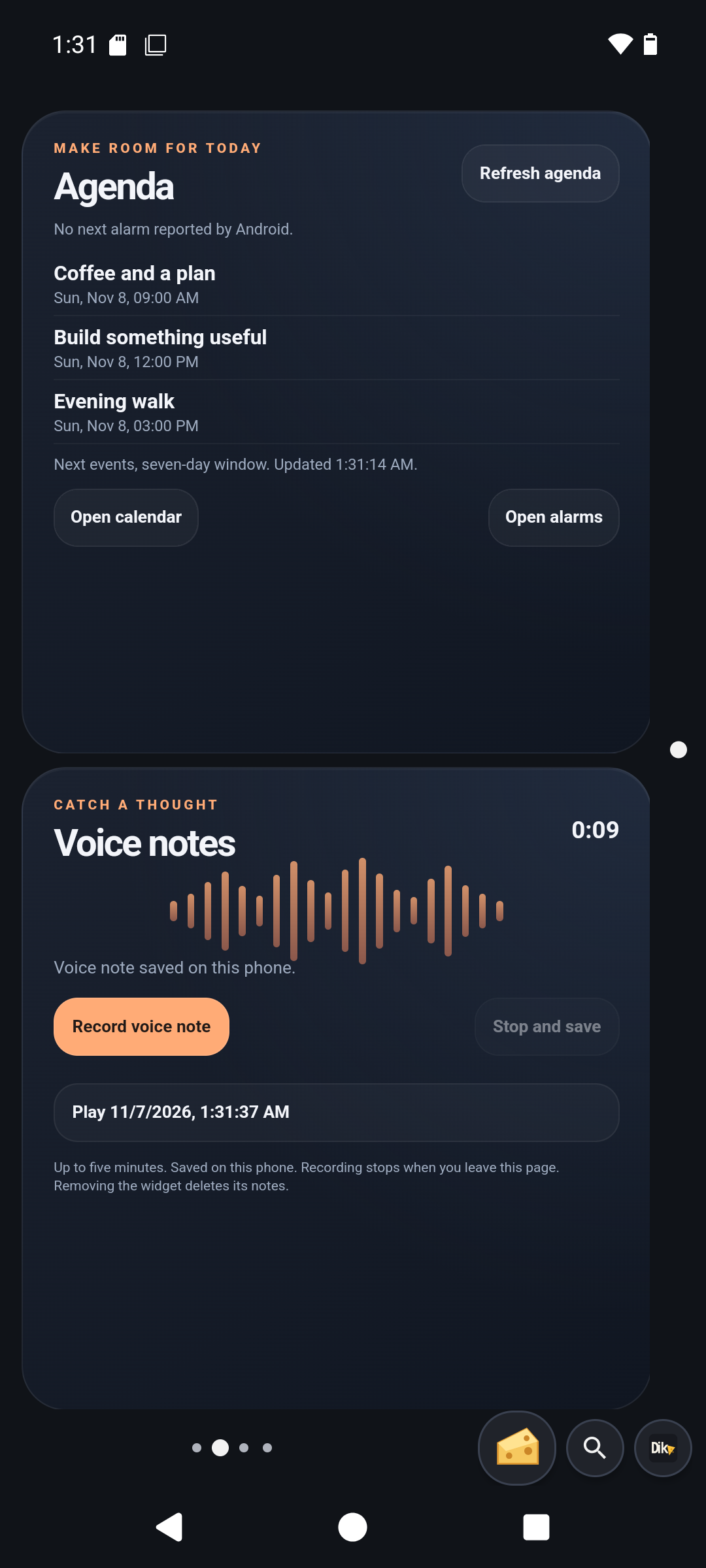
Agenda occupies three rows. It shows the next Android alarm and up to three upcoming calendar occurrences in the current seven-day window. Android expands recurring events. All-day dates retain their calendar date. Calendar data stays on the phone. Tap Allow calendar access, return from Android and tap Refresh agenda. The document refreshes once a minute while visible and when reopened. Its bounded preview scans up to ten pages of fifty occurrences and directs you to Calendar when more remain. Open calendar and Open alarms request Android activities. Missing handlers produce an explicit error. The widget never changes events or alarms.
Voice notes occupies three rows. Recording starts only when you tap Record voice note. If access is missing, review it and tap Record again. Tap Stop and save to finalize an AAC M4A. Recording has a five-minute maximum and stops when the page becomes hidden. This is foreground microphone capture. Android interruptions report failure rather than claiming a saved recording.
Completed audio moves into this widget's directory with generated filenames. The five most recent recordings have playback buttons; earlier files and metadata remain. Stop playback releases playback. A failed move or metadata save leaves Retry saving available. Saved notes survive reopening; removing the widget deletes them. Copy recordings elsewhere before removing the widget to keep them. Active recorder sessions do not survive process death.
Device
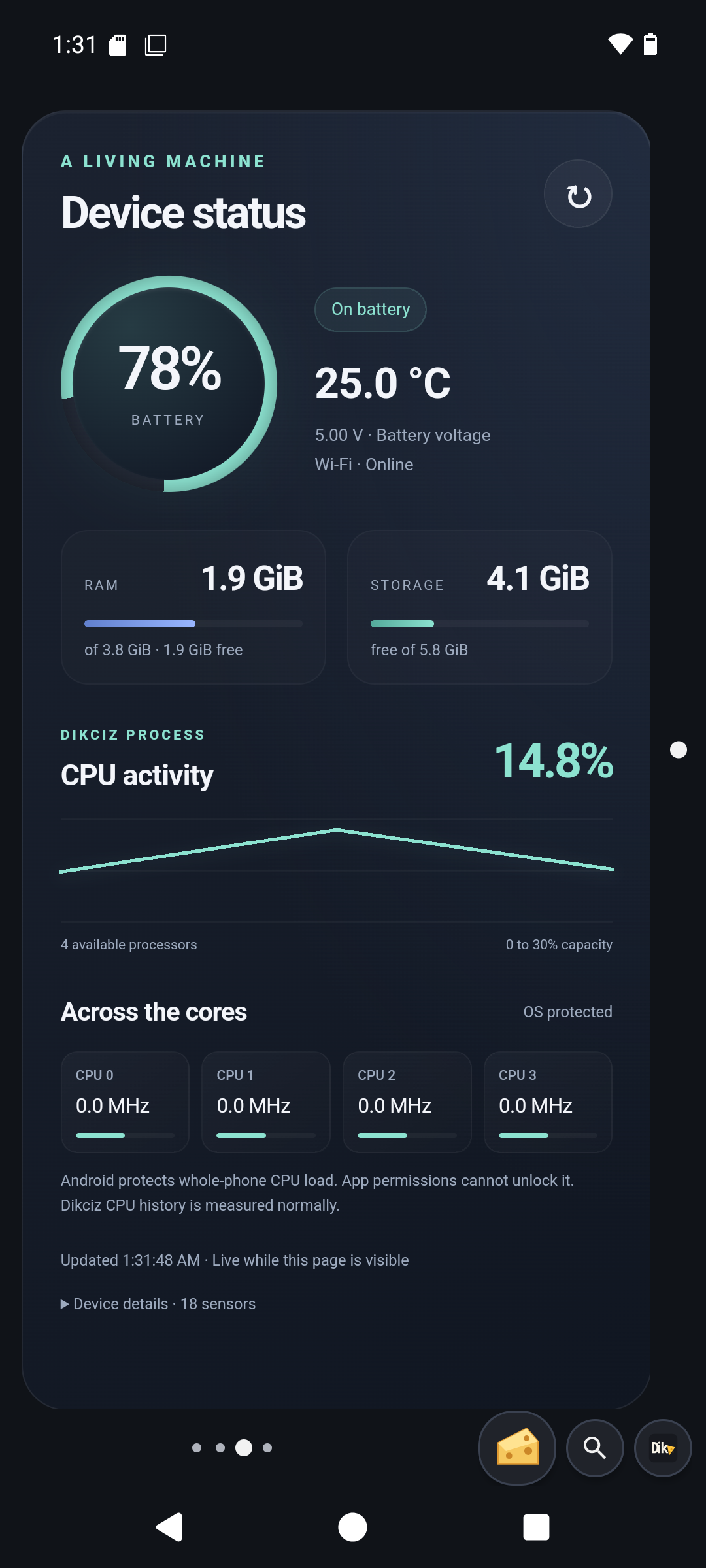
Device status fills its page with a battery ring, temperature and voltage, network state, RAM/storage meters, bounded CPU history and individual core tiles. It refreshes every five seconds while visible or when you tap refresh. Storage describes the filesystem holding Dikciz app data. Network presence does not guarantee working internet. It starts no sensor listeners and requests no root access.
The chart measures this Dikciz process as a percentage of available processor capacity. It excludes other apps and separate WebView renderer processes. Android can protect whole-phone CPU counters and clock files; a runtime permission cannot unlock them. Protected values stay unknown. Where exposed, core tiles show measured utilization or a clock frequency labeled in MHz or GHz. Clock speed is not a guessed utilization percentage.
Goblin
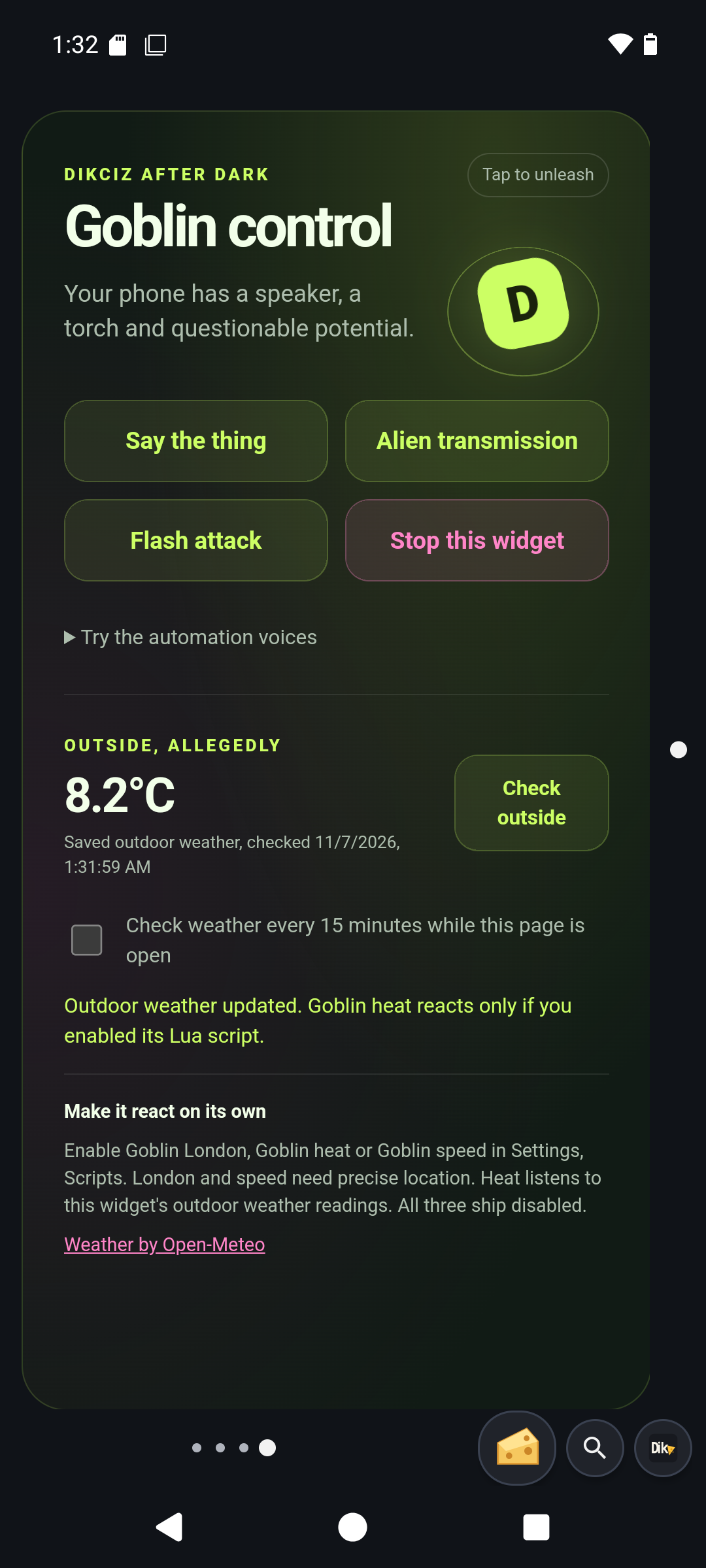
Goblin control is a complete editable WebView. Say the thing speaks "Peen goes in vageen." The three preview voices demonstrate the London, heat and speed announcements without enabling their scripts. Alien transmission synthesizes a quiet, finite 2.4-second sound locally through Web Audio; it downloads no audio. Flash attack submits eight 250-millisecond torch pulses with native off timers. All effects start on a tap and use the current media volume. Leaving the page requests sound/light cleanup. Stop this widget stops its effects, cancels its weather request and disables its weather watch. Independently enabled Lua scripts must be disabled in Settings, Scripts.
Check outside requests permitted phone location and sends coordinates to Open-Meteo for outdoor air temperature in Celsius. Battery temperature is never used. A checked weather-watch box repeats this at most every fifteen minutes while the widget is visible. No background weather fetch runs after leaving the page. Requests time out after fifteen seconds, accept at most 64 KiB and reject readings older than one hour. Successful readings retain their check time and emit goblin.weather; the heat script reacts only when separately enabled. Multiple copies have independent saved weather/watch state.
London and speed run from native location events when their scripts and precise Android location access are enabled, including while the widget is hidden. Their units and accuracy come from Android Location. They do not bypass Android background-location or service restrictions. The London rule is a radius around 51.5074, -0.1278, not an administrative city boundary. Edit the Lua constants and phrases to customize triggers. Stored latches and timestamps suppress repeats across restarts. Speech failures remain visible in script status and are not marked spoken.
Optional complete templates
Previously placed documents and existing public library packages keep their saved source during APK updates. Reset the bundled home or update a document with the new package source to adopt widget-script fixes.
The picker includes all six starter documents with fresh independent state. The combined Home dashboard, app search, notes, detailed System dashboard, Live sensors, and BTC and economic news remain optional. Adding a template copies its entire document. Save to library makes a customized document reusable. Library edits never silently change placed widgets. Reduced-motion settings and visibility control optional visual effects.
The sensor template samples real hardware while visible. Markets and news fetch on explicit Refresh, retain dated successful data and report provider failures. See HTML editing, configuration and API coverage.
Optional Lua utilities
Six examples start disabled. Review them in Settings, Scripts before enabling them. Policies and subscriptions are prepared. The heat example consumes the Goblin widget's weather events; the GPS examples use native location events.
| Script | Behavior |
|---|---|
low-battery | One notification at 20 percent or lower while discharging. Charging or reaching 30 percent resets it. |
charge-ready | One notification at 80 percent or higher while charging. Unplugging or dropping below 75 percent resets it. |
screen-lock | Explicit manual lock with owner-enabled Device Administration. Granting access never triggers it. |
goblin-london | With a precise GPS fix accurate to 500 metres, entering 20 km of central London says "God save the Queen! The goblin has arrived in London." Leaving 25 km rearms it; a six-hour cooldown prevents rapid reentry chatter. |
goblin-heat | Fresh goblin.weather readings above 35 Celsius say "It's hotter than Satan's armpit. The goblin is being slow cooked!" Below 32 Celsius rearms it; the cooldown is 30 minutes. |
goblin-speed | Precise GPS speed above 80 km/h, with accuracy within 100 metres, says "Slow down! Your shit is about to come out of your arse!" Below 65 km/h rearms it; the cooldown is 15 minutes. |
Notification reminders need Android notification permission. Add a native script dashboard from the picker when wanted. See Lua scripting.
Complete bundled widget catalog
Choose these by name in the Dikciz widget picker. Each library insertion copies the entire HTML, CSS and JavaScript document with independent saved state; editing one copy does not change the others. The first six documents are placed on the bundled pages. Native app shortcuts, Android provider widgets and the Lua script dashboard remain separate picker choices.
| Template | What it does |
|---|---|
Time and weather (time-weather) | Clock, location or manual-city weather, air quality and saved readings. Home. |
Most used apps (most-used-apps) | Real app icons, optional usage ranking, checked launches and manual torch/speech buttons. Home. |
Agenda (agenda) | Read-only calendar preview, next Android alarm and calendar/alarm shortcuts. Tools. |
Voice notes (voice-notes) | Tap to record, stop/save and replay widget-owned voice notes. Tools. |
Device status (device-status) | Live battery, memory, storage and process/per-core CPU display where Android permits it. Device. |
Goblin control (goblin-console) | Manual speech, local alien sound, timed torch pulses, weather checks and optional weather watch. Goblin. |
Home dashboard (home-dashboard) | Full-page clock, app search with Android icons and saved note. |
System dashboard (system-dashboard) | Detailed full-page battery, memory, storage and CPU data with explicit restricted counters. |
Live sensors (sensors-dashboard) | Visible-page readings from accessible hardware sensors, with accuracy and unavailable states. |
BTC and economic news (markets-news) | Explicit Coinbase BTC/USD and GDELT economic-headline refresh with dated saved data. |
Clock and search (command-deck) | Compact clock, date and web-search launcher. |
Find an app (quick-apps) | Search installed apps and launch a selected result. |
Quick note (quick-note) | Save a short editable note on this widget. |
Android app settings (app-launcher) | Open Android installed-app settings. |
Android display settings (brightness) | Open Android display settings. |
Lock screen (lock-screen) | Request native screen lock with owner-enabled Device Administration. |
Post a notification (notifications) | Post a direct native notification with Android notification access. |
Dikciz diagnostics (system-status) | Read Dikciz diagnostics and a bounded recent log record. |
| Vehicle console (vehicle-console) | Optional paired ELM327 dashboard with RPM, coolant and adapter voltage. Explicit connect and stop, no vehicle actuation. See connections. |