Safety, places and journeys
Open Settings, Safety, journeys and devices for the SOS app and native Places/Trips screens. SOS is also under Dikciz, Apps. Its complete HTML/CSS/JavaScript interface, JavaScript backend and state live in /sdcard/Dikciz/apps/sos/; its decisions use the same custom-app platform available to owner-created apps. The same operations are available through HTTP, WebSocket, MCP, HTML and Lua. Discover the installed schemas before sending commands.
On the phone
- Open Dikciz > Apps > SOS and check-ins. Use SMS access, Location access and Notifications to review required Android access. Contacts access is optional when entering exact numbers.
- Enter a Name and Exact phone number, then tap Add number. Alternatively, use Find a contact and Search contacts to select a result. Review the resulting recipient list.
- Edit the message, check-in interval, cancellation grace, update interval and maximum updates. Tap Save inactive plan. Saving alone starts no monitoring or messages.
- Tap Preview exact message and inspect the recipients, location text and timing before starting anything.
- Arm missed check-in waits for the check-in deadline. Start SOS countdown begins cancellation grace immediately. Both require the app's confirmation. I'm safe. Reset check-in postpones an armed deadline.
- Use the modal's Cancel SOS or the app's Cancel future messages to stop pending work. Read Submission and delivery for actual callbacks. Cancellation cannot recall submitted messages.
The screen guide shows the dimmed countdown and cancellation controls. The complete editable app is shown under Apps.
Contact plans and check-ins
Save exact contact addresses with sosPlanSave. Each contact has address and optional label. The app can search phone contacts without modifying them. Saving a plan stays inactive. Preview with sosPreview; it does not submit SMS. These compatibility commands invoke the bundled app backend; removing or disabling that app makes its commands unavailable until restored or enabled. Preview enforces read-only host commands even if its source has been edited.
checkInSeconds defaults to 3600, minimum 60. graceSeconds defaults to 60, minimum 5. updateSeconds defaults to 600, minimum 60. maximumUpdates defaults to 3, range 1..24. Up to ten distinct recipients are allowed. The optional message supports {location}, {accuracyMeters} and {timestamp}; absent or stale fixes remain explicitly unavailable. Optional subscriptionId chooses an SMS SIM.
Use sosControl with action: arm or trigger and confirm: true. Arming waits for the check-in deadline, then enters a cancellation grace. Triggering begins the grace immediately. checkIn resets the check-in deadline. cancel prevents future submissions. It cannot recall submitted SMS. Read sosStatus for saved plan, run state and receipt keys. Query the existing smsStatus command for carrier outcomes; submission is not delivery.
Monitoring requires foreground location, SMS sending and notification access. A visible custom-app foreground notification provides Pause apps. Android can delay inexact alarms, restrict background starts, stop processes or lose service. Rebooted or interrupted claimed runs become needs_review and do not resume outgoing messages automatically. This is an owner automation, not a guaranteed emergency service. Review permissions and test cancellation before relying on a plan.
Each recipient/update has a persisted idempotency key and frozen message before dispatch. The native SMS ledger preserves accepted submissions; interrupted claimed batches need review rather than automatic replay. A completed run stops at the configured update limit; rejected submissions need review.
Audible cancellation warning
During cancellation grace, Dikciz shows a large countdown and Cancel SOS button over other apps when Draw over other apps access is granted. The alert uses a full-screen dark backdrop and a centered card with a pinned action. Background taps and Back do not dismiss the alert or reach the app underneath; use Cancel SOS to stop pending messages. Without that access, it shows a dialog while a Dikciz activity is visible and retains an urgent SOS message pending notification with its own Cancel SOS action. Tapping the notification opens Safety controls. Android controls whether a heads-up or lock-screen notification appears; an overlay cannot bypass the keyguard or system-protected windows.
The warning pulses an alarm tone and vibration and uses an installed offline English TTS voice to explain that SOS messages are pending and how to cancel. For grace periods longer than ten seconds, it speaks another warning near the final ten seconds. The app does not change volume or Do Not Disturb. An absent speech engine or offline voice leaves the visual and tone warning available. Arming requires the separate SOS countdown notification channel to remain urgent.
sosStatus.warning reports whether a warning episode is active, the observed presentation, attached unlocked-screen visibility, remaining seconds, requested audio/vibration, alarm volume and speech state. These are execution observations, not proof that a person heard the alert. The same presentation runs for manual triggers, missed check-ins and the grace interval before subsequent configured updates. API/native cancellation stops future sends and warning resources. A message already submitted cannot be recalled. Ordinary geofences and route recording stay quiet and continue when only SOS is cancelled.
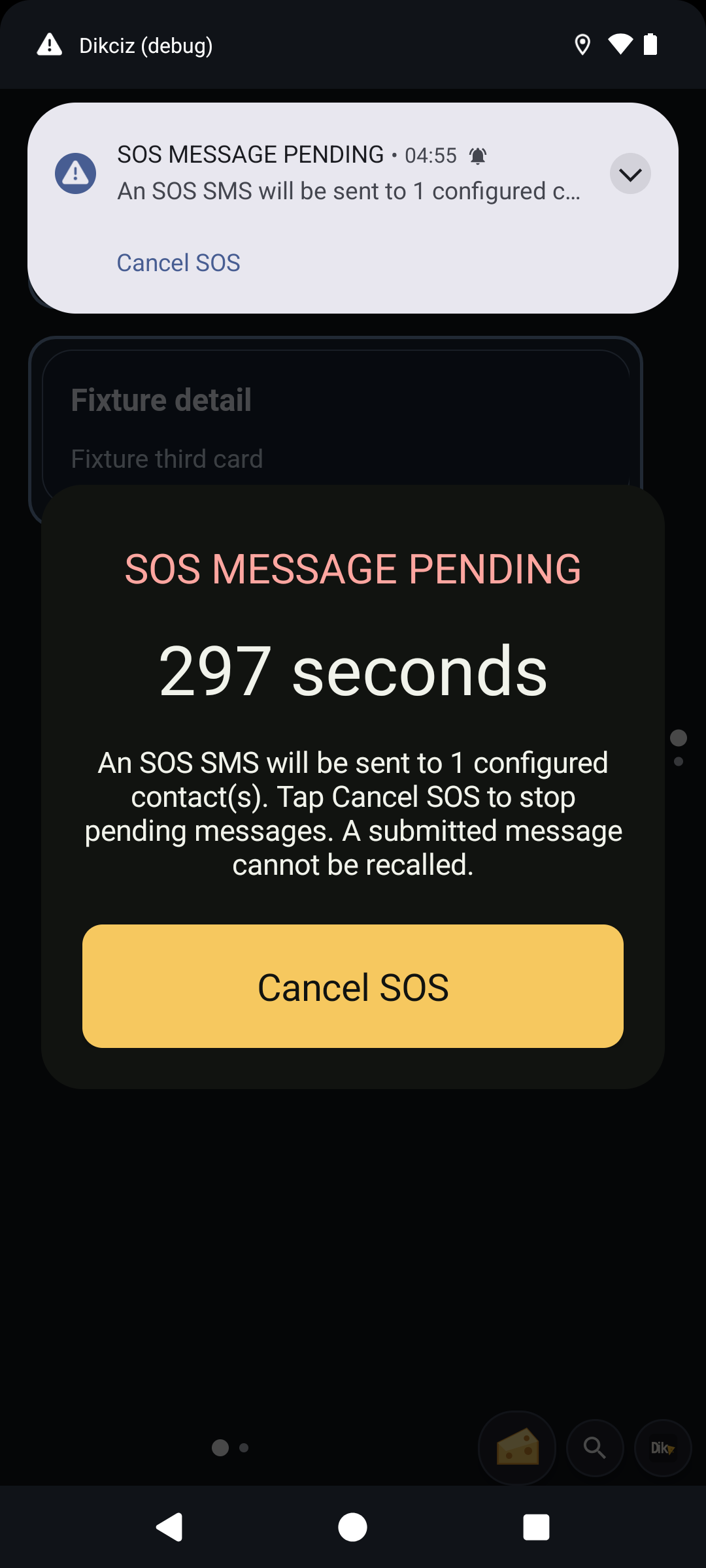
The warning card above was captured on the isolated emulator before cancellation.
Places
geofenceSave accepts title, latitude, longitude and radiusMeters (100..1000000), optional ID, enabled (false by default) and dwellMilliseconds. Up to 32 fences can be saved. Monitoring uses Android location callbacks, accuracy checks and crossing hysteresis, with a visible location service. It emits geofence.enter, geofence.exit and optional geofence.dwell through the ordinary custom-event bus. Event payloads identify the fence and observed fix. Dwell uses elapsed time. A reboot establishes a fresh observation.
List with geofencesList and ordinary offset/limit pagination. Delete one exact ID with geofenceDelete. A renamed fence keeps its observation state when its geometry and monitoring settings remain unchanged.
Recorded journeys
journeyControl with action: start starts one active route, optionally naming it and choosing sampleIntervalMilliseconds (1000..60000, default 10000). action: stop requires the journey ID. No location is invented between samples. Distance sums accepted sampled segments and includes GPS uncertainty.
journeysList lists saved summaries. journeyRead pages ordered points using ID, offset and limit; follow hasMore. Each point includes fix time and accuracy. Up to 64 journeys and 10000 points per journey are retained. Reboot interrupts recording. Stop before deleting; journeyDelete requires ID and confirm: true, and removes owned route points too. The native route preview draws recorded coordinates locally.
SOS plans and run state live in /sdcard/Dikciz/apps/sos/state.json, while running/stopped flags, timer claims and native run observations remain private SQLite records. Existing private SOS plans migrate once; previously active runs require review. Geofences and route history remain private companion data. These records and custom apps are not currently included in portable home/chat backups.
A public-home reset does not recall SMS. Cancel active safety monitoring explicitly before resetting a setup, and preserve the SOS app state separately if needed.